Vroom
Building intentional software for live experiences that treats each event as a choreography of venue, vendors, and people.
Team
- Linda Xue
- Vikram Gupta
- Ali Khatib
Overview
I helped build Vroom Events, connecting the planning workspace to provider search and outreach. On Vroom Tickets, I worked across web and mobile on photos, guests, messaging, and check-in. I also built Vroom Tea, a local feed for venue questions and experiences.
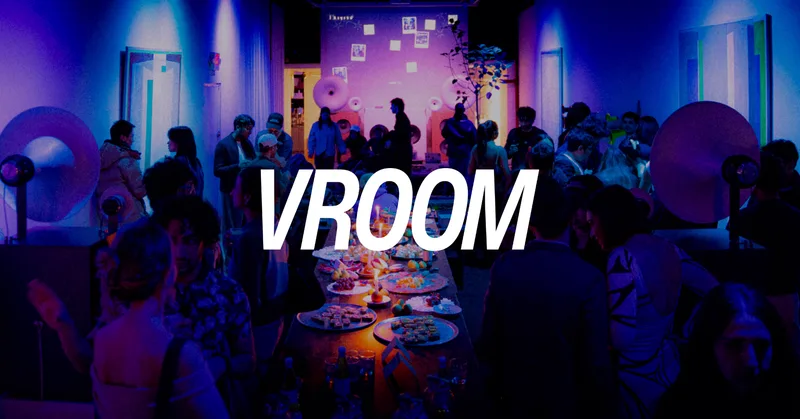
Fig. 1. Vroom in motion
Vroom brought together the work of planning an event and the experience of attending it: finding a venue, coordinating providers, inviting guests, selling tickets, and sharing photos afterward.
I worked across the planning workspace in Vroom Events, the web and mobile experience in Vroom Tickets, and local venue discovery in Vroom Tea. Being on an early-stage team gave me room to own features across the interface, APIs, database, and background jobs. I also helped run events with the team using the software we were building.
That combination was one of my favorite parts of the experience. I could follow a feature from the systems behind it to the people using it at an event.
Engineering at Vroom
A lot of my work was about connecting parts of the product: turning provider data into useful search results, carrying event context into outreach, and making sure a failed background job did not undo something that had already worked. Here are the projects I spent time on.
Vroom Events
The Events workspace brought provider discovery, shortlists, conversations, and planning into one place. I helped build the infrastructure connecting those views, including provider data normalization, streaming search, outreach generation, and shared application behavior.
Fig. 2. Vroom Events workspace
A shared foundation for the workspace
A provider record moved through several parts of the application before an organizer contacted it. Lookup populated the form, the form saved the record, search filtered it, and outreach used it as context. Each layer needed to understand the same category and location values.
I standardized those representations across forms, validation schemas, shared types, and search. A normalization layer mapped inputs such as “event space,” “event-space,” and “event venue” to event_space, deduplicated categories, and normalized contact details and city aliases. That gave the different views a common vocabulary instead of requiring each one to interpret the record independently.
Fig. 3. Moving between views of an event
Outreach had a similar coordination problem. Proposal acceptance, bulk actions, and the chat agent had accumulated separate trigger paths. I consolidated four paths behind a shared outreach.draft event, with one Inngest invocation per shortlisted provider. Each provider's job could then retry independently, while the interface used the same entry point to start the work.
- One vocabulary
Category aliases resolve to the same stored value, so forms, search, and outreach interpret a provider consistently.
- One entry point
Four outreach trigger paths share the outreach.draft event, including proposal acceptance and bulk actions.
- Independent retries
One Inngest invocation per shortlisted provider lets a failed job retry without restarting the whole shortlist.
I also worked on the application's shared behavior: centralizing API errors and structured logging, removing a reply poller that still called a deprecated endpoint, and redesigning pricing with the existing card, button, and badge components. Fixing the pricing route's onboarding redirects connected that redesign to the actual signup flow.
Fig. 4. The team's task boards alongside the planning workspace
Progressive provider search
Provider search combined two kinds of requirements. Location and capacity could be expressed as database filters. Atmosphere—an intimate gallery, an industrial space, a rooftop with skyline views—needed a semantic comparison with the provider's description.
I built a streaming search implementation that handled those requirements in stages. Supabase first retrieved a pool of up to 75 providers using structured filters. The server sent that pool to the client immediately, then embedded the requested atmosphere with text-embedding-3-small through OpenRouter. A PostgreSQL/pgvector function compared the query with stored provider embeddings and returned a new ordering.
The key constraint was that ranking could only reorder the initial pool. Every provider had to survive each stage. A missing embedding moved a provider to the bottom; a failed ranking call kept the original ordering. The interface could therefore show the database results while semantic ranking was still running, and retain them if it failed.
From event requirements to a progressively ranked list.
- Apply location, category, capacity, and other event filters. Retrieve up to 75 providers; atmosphere is handled in the next stage.01Build the candidate poolSupabase · structured filters
- Send the entire pool to the browser immediately. The organizer can see matching providers while semantic ranking runs.02Show the first resultsSSE · skeleton
- Turn a phrase such as “an intimate gallery” into a 1,536-dimensional query vector. Provider vectors are already stored.03Embed the atmosphereOpenRouter · text-embedding-3-small
- Compare the query with embeddings for this pool only. Sort by similarity, keeping providers without embeddings at the bottom.04Reorder the same providersPostgreSQL · pgvector
- Replace the visible ordering with the full ranked pool. The final event marks completion; this version adds no further model-ranking step.05Stream the updated orderSSE · reranked → final
The ranking merge started from the original candidates, rather than from the rows returned by the similarity lookup. That kept a provider in the result even when its embedding was missing. This excerpt shows the merge and sort before the final score mapping:
const withSim = stage1Scored.map(c => ({
  candidate: c,
  semantic: similarities.get(c.id) ?? null,
}))

withSim.sort((a, b) => {
  const sa = a.semantic ?? -Infinity
  const sb = b.semantic ?? -Infinity
  if (sa === sb) return 0
  return sb - sa
})
Equal scores retain their original relative order. Missing similarities sort last, but the candidate records remain in the pool.
The server streamed skeleton, reranked, and final events over Server-Sent Events. I carried a request ID through that sequence and used an AbortController to cancel an older search when a new one began. The client also ignored stale IDs, keeping a late response from replacing the current results. I added integration tests around that contract: stage order, cancellation, empty results, and preservation of the candidate pool.
Provider embeddings were prepared outside the search request. I added a database-triggered queue for changes to provider descriptions and related fields, then an Inngest worker that processed 32 providers per batch. It stored 1,536-dimensional vectors for reuse, leaving only the user's query to be embedded at search time. Transient API failures used bounded retries with backoff; repeatedly failing queue entries remained available for inspection.
- Queue changed records
Database changes to descriptions and related fields enqueue providers for embedding outside the search request.
- Work in batches
An Inngest worker processes 32 providers at a time and stores 1,536-dimensional vectors for reuse.
- Keep failures visible
Transient API failures use bounded retries with backoff. Repeated failures remain available for inspection.
Provider lookup with traceable fields
Finding an existing provider and adding a new one required different workflows. For new providers, I added URL-based lookup that turned a page into a structured form, with 22 fields spanning contact details, capacity, pricing, and venue facilities.
The reader fetched the supplied page, stripped its HTML, and passed the text to GPT-4o mini through the OpenAI SDK and OpenRouter. JSON Schema constrained the output, and Zod validated it before the form consumed it. Every populated field carried both a value and a source URL; information the model could not establish could remain null.
That source information was part of the result itself. An organizer could inspect where a capacity or contact detail came from while editing the provider record. The reader operated on the supplied page, with a ten-second fetch timeout, so missing information remained an explicit gap in the form.
+ validate
- field
- capacity
- value
- extracted number
- source
- supplied page URL
- unknown
null
Fig. 5. Organizing providers in the workspace
From context to an outreach draft
Once a provider was shortlisted, the next step was an inquiry grounded in both the event and the provider. I replaced a single generation call with a staged chain: distill, plan, draft, verify, and refine when a check failed.
Claude Haiku extracted facts from the stored provider description. Claude Sonnet used those facts and the event context to build a writing plan and draft the message. A second Haiku call returned a verification report, which could trigger one Sonnet refinement pass. Structured intermediate outputs carried the facts, plan, and reported issues between stages.
- DistillHaiku · provider facts
- PlanSonnet · event + history
- DraftSonnet · subject + body
I separated context collection, generation, and sending into distinct modules. The context collector fetched the provider, event, and user records in parallel, then attached the current conversation and prior interactions from accessible events. The generator could use that history to distinguish a first inquiry from a returning relationship or an unanswered conversation.
The chain also defined what happened when a model call failed. Planning could fall back to a template, and an unsuccessful refinement retained the original draft. A verifier outage also retained the draft, which meant verification was a best-effort step.
I connected the output to the approval workflow. Manual mode created a Gmail draft and a pending-approval record containing a context snapshot, advanced the contact state, and notified the reviewer. Automated mode sent through AgentMail and recorded a pre-approved entry. I also removed the event's budget from the context passed to generation, supplementing the prompt instruction to omit it from outreach.
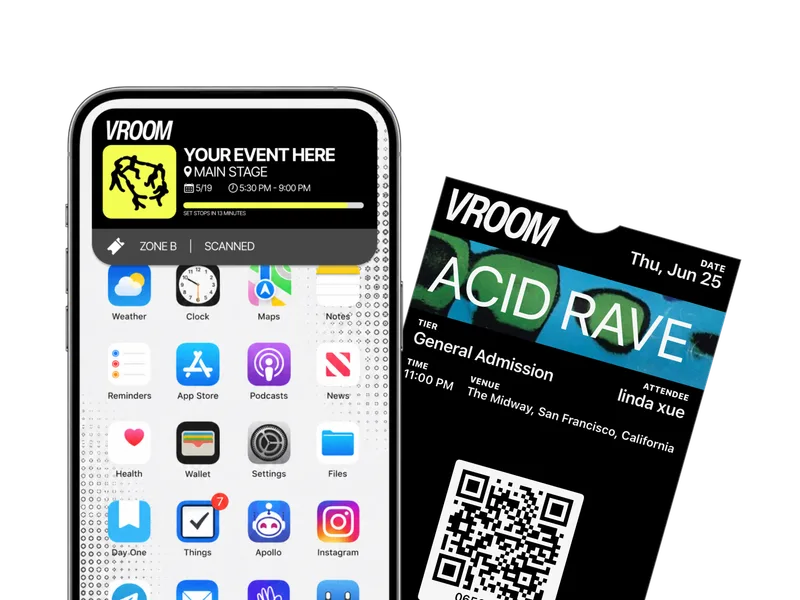 Fig. 6. Tickets and the attendee experience
Vroom Tickets
On Vroom Tickets, I worked across the Next.js web app, the React Native/Expo app, and Supabase. My contributions centered on event photos, RSVP guests, organizer messaging, mobile check-in, and the confirmation flow after a purchase.
Photo uploads and recovery
A photo upload crossed several systems: the device prepared the image, storage accepted the file, the database recorded it, and the tagger processed it. Those operations could succeed or fail independently.
I connected the mobile photo drive and added thumbnail generation on web and mobile. The web helper produced a preview with a maximum dimension of 480 pixels, while image re-encoding stripped EXIF metadata on the successful path. If re-encoding failed, the helper allowed the original file as a fallback.
I added explicit tagging states—pending, processing, done, and failed—and a scheduled retry path. Every ten minutes, the worker selected up to 20 eligible photos, stopping after three attempts per photo. An admin endpoint exposed tagger health and backlog counts so processing state could be inspected separately from the gallery.
20 per batch · at most 3 attempts per photo
Storage needed its own recovery mechanism. A failed database insert could leave an uploaded file without a photo record. I added a cleanup job that compared storage paths with the photo table and waited an hour before considering an unmatched file for deletion, avoiding immediate competition with uploads still in progress. The job bounded its work to 500 files per run.
A shared gallery
Beyond uploading, I worked on how people explored and contributed to the event's photos: a realtime photo wall, new-photo notifications, comments, caption editing, ZIP downloads, collaborative-album APIs, and a highlights carousel. I also fixed mobile thumbnail errors and nested-list behavior and added loading and empty states.
For “Browse by Person,” I built database functions, an API, and the gallery interface around the existing face embeddings. The grouping procedure compared faces within an event, reused a cluster above a cosine-similarity threshold of 0.65, and created a new cluster otherwise.
Moderation lived in the database as well as the UI. A unique constraint allowed one report per person per photo, and a trigger hid a photo after three reports. Producers could review flagged photos in a separate queue.
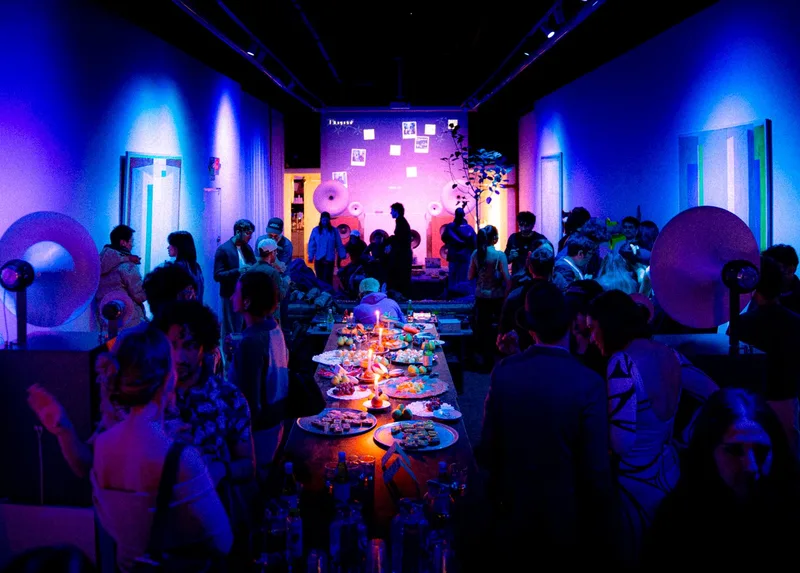 Fig. 7. A gathering at Vroom
Guests across web and mobile
I added identified +1 guests to the RSVP flow, including guest editing, invitation links, and a claim route. The change crossed database migrations, shared types, API routes, and both interfaces: a guest entered on the web needed to remain the same guest when viewed on mobile.
I also built schedule and signup-list widgets, with organizer editors and attendee signup behavior. Around those flows, I added a donation modal, RSVP fixes, live countdowns, event share cards, and interface-level guest-list hiding before RSVP.
Fig. 8. Event creation, alongside my guest and widget additions
The check-in flow exposed a concrete mismatch between tickets and RSVPs. The mobile scanner always called scan_ticket, and its URL parser could not preserve an rsvp: code. I updated the parser and routed scans to either scan_rsvp or scan_ticket, passing the expected event ID to each function. The result overlay then showed the RSVP guest's name and +1 count.
rsvp:?The routing change preserved the RSVP prefix and selected the corresponding database function. This excerpt shows the dispatch after the code has been extracted:
const isRsvpQr = code.startsWith("rsvp:");

const { data: scanResult, error } = isRsvpQr
  ? await supabase.rpc("scan_rsvp", {
      p_qr_code: code,
      p_event_id: linkedEvent.id,
    })
  : await supabase.rpc("scan_ticket", {
      code,
      expected_event_id: linkedEvent.id,
    });
Fig. 9. Mobile check-in, extended to support RSVP QR codes
Purchase confirmations and organizer messaging
After checkout, a buyer needed more than a successful payment: a route back to their tickets and actions for the calendar, Wallet, transfer, or refund. I built the confirmation service and connected it to completed Stripe checkout fulfillment. Transfer and refund links opened the corresponding dialogs on the ticket page.
The service used Resend for email and Twilio for fallback SMS when an organization had no active messaging channel. I deferred that work through the existing execution helper so message delivery would not block or fail the Stripe webhook response. That kept fulfillment and communication as separate operations, each with its own failure path.
Fig. 10. The team's attendee app and Wallet integration; I added post-purchase action links
For organizer broadcasts, I added MMS image support across the composer, database, scheduled-send path, and Twilio payload, with tests for messages with and without attachments. I also fixed a send-now bug where background sending could outlive the request by attaching it to the Next.js after() lifecycle.
Per-recipient delivery details and a failed-send retry endpoint gave organizers a way to follow up when a broadcast only partly succeeded. Attendee and member CSV exports, RSVP rows in organizer tables, and contact-detail fixes rounded out the operational side of that work.
- Complete fulfillment
Connect the confirmation service to completed Stripe checkout fulfillment and include links back to ticket actions.
- Defer delivery
Run confirmation messaging through the execution helper so a delivery failure does not fail the webhook response.
- Recover broadcasts
Per-recipient delivery details and a failed-send retry endpoint make partially successful organizer broadcasts actionable.
Fig. 11. The team's messaging experience; my work included broadcasts and confirmations
Vroom Tea
Vroom Tea approached discovery through information from people who had been to a venue. I built it around warnings, recommendations, questions, and short posts linked to a venue and neighborhood. People could explore the local feed, visit venue-specific pages, and vote on contributions.
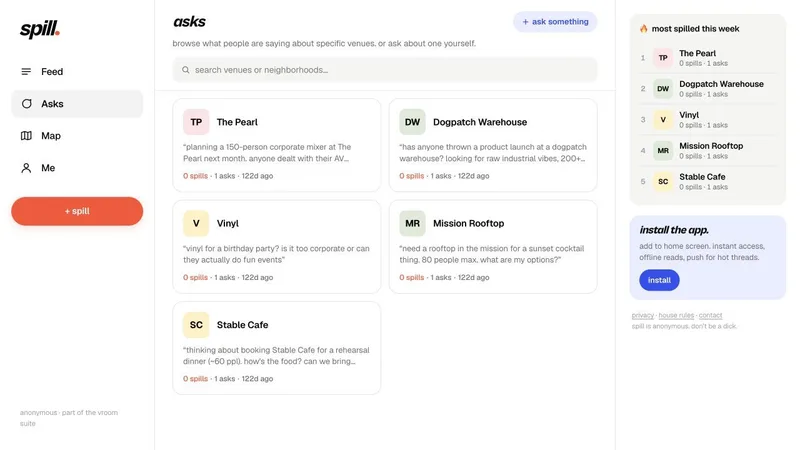 Fig. 12. Vroom Tea venue questions
Freshness and local ranking
Freshness was part of the data model. Red flags expired after 14 days, green flags after seven, and tea after 72 hours. The feed excluded expired posts, so votes alone could not keep an old contribution visible indefinitely. Venue questions lived in a separate Supabase table with their own venue and location fields.
The hot feed retrieved the 50 most recent unexpired posts, narrowed them geographically when coordinates were available, and ranked that candidate set in application code:
score = max(upvotes − downvotes, 0) / (ageHours + 2)^1.5
This combined community votes with a time-decay factor. Its scope was deliberately bounded by the query: ranking happened within the fetched 50 posts, and latitude/longitude bounds approximated nearby activity. It did not rank the entire database or calculate exact distance.
Public identity and posting limits
The public interface used emoji identities, while the server used a phone hash to track posting activity. This supported limits of five posts per day and one post about a venue per day without displaying phone numbers in the feed. Public question responses also excluded that internal hash.
What I learned
Familiar interactions take a lot of care
A lot of what we were building used familiar UI patterns: buttons, menus, expandable sections. I used those things in other software without really thinking about them. At Vroom, building the components from scratch made me appreciate how much thought goes into making them feel good. I initially underestimated how difficult it could be to make something as simple as a check-in button look right, feel satisfying to tap, and be easy to use.
I remember sitting with Linda for hours as she worked on accordion menus, refining how they expanded and collapsed until the motion felt fluid. I admired how much care she put into those details. Watching that process changed how I looked at UI and design: even an interaction people barely notice can take a lot of intention to get right.
A feature crosses more boundaries than its interface suggests
A provider form looked like one part of the workspace, but its category and location values also shaped search and outreach. A guest added on the web needed to remain the same guest in the mobile app and at check-in. Working across those flows taught me to follow the data beyond the screen I was changing.
Recovery is part of the feature
An upload could succeed while tagging failed. A purchase could complete while its confirmation message still needed to be sent. Those cases shaped how I built the workflows: keep their states separate, preserve successful work, and give the failed step a way to recover. The retry paths and delivery details were as much a part of the feature as the initial action.
Owning the whole path was the most rewarding part
I liked being able to move between the interface, APIs, data model, and background jobs instead of stopping at one layer. Working on an early-stage product gave me practice making decisions, seeing their consequences elsewhere in the system, and revisiting them as the product changed.
Outside engineering
I also helped run events with the team, including the Rough Draft series, Field Day, and a yacht party. Guest lists, check-in, messages, and shared photos became parts of an experience we were helping put on.



Building the tools and helping run the events connected the engineering work to the people it was for. That is what I appreciated most about working on Vroom: getting to build across the product and be part of the experience around it.